Posts

Updating Dell iDRAC ISM

Image
I was working on installing iDRAC for an ESX host, and ran into a little trouble. Here's a small guide for the steps to do it. Googling it leads you to this article: https://www.dell.com/support/manuals/us/en/04/idrac-service-module-v3.1/ism_3.1_users_guide/using-the-vsphere-cli?guid=guid-1606fa9a-19ad-4394-a65f-72fb0312a2c7&lang=en-us I didn't think this was clear enough, so here's some pictures too When you are inside of iDRAC, you will see this: Download the iSM installer. Next: Create a Folder inside a datastore Upload the ZIP you downloaded from iDRAC Enable SSH and ESXCLI inside the host SSH into the host CD to the directory Actual command I ran: esxcli software vib install -d /vmfs/volumes/5d135ad3-ff5e8e7c-6d02-e4434b77b398/ISOs/ISM-Dell-Web-3.4.0-VIB-ESX6i-Live.zip Even though it says you don't need to restart, you will need to get iDRAC to recognize it.
VMWare Host Not Reconnecting After Network Outage

We had an issue recently that was low priority, but still annoying. When a network outage would occur, the ESXi hosts running 6.5 would not reconnect to vCenter, both running 6.5 and 6.7. The ham-fisted approach was to restart the host, but that caused downtime for the VMs. All the articles I found said to restart the management agents, but that did not work. We could log in to the host just fine, and all VMs were running without issues, so we knew the issue wasn't with the host. I finally figured it out because I SSHed into both vCenter and then the host, and the host could ping vCenter but vCenter couldn't ping the host. However it could ping everything else in that site so its wasn't a routing issue. And I knew that if restarting the host fixed the issue, it wasn't on vCenter's side. The fix is to restart the management network directly on the ESXi host, using the DCUI. To do so, enable SSH on the host via the web client UI, SSH to the host, login, launch d...

Get-LoggedinUser and Get-LoggedInUserSID

Gets the username or user SID of a local or remote computer. Function Get-LoggedInUser { <# .SYNOPSIS Gets logged in user on local or remote computers. .NOTES     Author:  Curtis Wright     Email:   curtis (at) cwew.co     Date:    05FEB2018     PSVer:   2.0/3.0/4.0/5.0 #> #Allowing Cmdlet Bindings [CmdletBinding(SupportsShouldProcess=$true)] Param( $Computer = $env:COMPUTERNAME, $domain = $env:userdomain ) Write-Verbose "Computer is $Computer and domain is $domain" #Getting the current Error Action Preference so the script can set it back after completion. $CurrentEA = $ErrorActionPreference Write-Verbose "Current Error action is $CurrentEA" $ErrorActionPreference = "SilentlyContinue" Write-verbose "Attempting to use WMI to get currently logged in user" $ActiveProcesses = Get-WMIObject win32_process -filter 'name="explorer.exe"' -ComputerName $Computer if (($ActiveProcesses.GetTy...

Get-OfficeVersion

PowerShell function that gets the currently installed office version and returns either the year, the office folder, the registry location, or the number. Updated 4/25/18 to support 64 bit office. Bitness is now a returnable Value Type. Function Get-OfficeVersion { #Allowing Cmdlet Bindings [CmdletBinding(SupportsShouldProcess=$true)] param(   [Parameter(Position=0,Mandatory=$true)]   [Alias("Value","VT")]   [ValidateSet("Office Year", "Office Folder", "Registry Location","Registry Number","Bitness")]   [string]$ValueTypeReturn,     [Parameter(Position=1,Mandatory=$false)]   [Alias("Computer","CN")]   [string]$ComputerName = $env:COMPUTERNAME ) Write-Verbose "Testing connection to $ComputerName" if(Test-Connection -Quiet $ComputerName -Count 1){ Write-Verbose "Connection Successful to $ComputerName" Write-Verbose "Detecting software for $ComputerName...

Outlook VBA Macros for Journal Entries

I recently discovered how amazing the Journal function is in Outlook. Primarily, it's great because it has a timer on it that you can use to track your time. It also allows you to categorize each Journal Entry with a type, as well as the categories already in Outlook. I like using this for if someone calls me, there's an entry type for "Phone Call". I'll record what the conversation was about. It automatically creates a new entry at the day and time you create it. If I'm working on a script, there's a Entry Type for "Scripting". I'll record notes on what I'm working on, and my findings/issues I run into. If I'm doing a task, there's one for "Task". All of these are great but I wanted to add a little more automation to it all. I didn't like that I couldn't easily start a new Journal Entry from the E-Mail Home Screen. I had to open the Journal, create a new Entry and then start the timer. Too much to do when so...

Application Doesn't Install During OSD Task Sequence in SCCM

Image
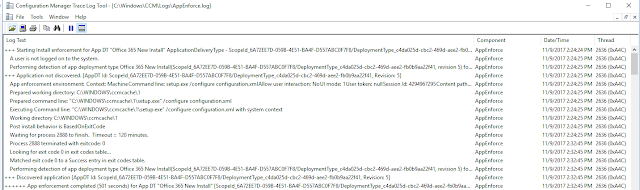
Dealt with a weird issue recently regarding SCCM and application installing. I was in the process of imaging a machine with SCCM when it was in the process of installing an application (Office 2016 in this case). I had to go, so I hard shut down the machine and put it away. Now, whenever I tried to reimage the machine, it would hang on installing Office 2016. If I held the hard shut down button, the machine had imaged correctly, and had joined the domain correctly. When I looked in the logs after logging in, I noticed that inside AppEnforce.log, instead of the normal logs, there were two install processes. I forgot to take a screenshot of the "bad" logs, but here's what they are supposed to look like. I noticed that there was an entry that said "Reconnecting to existing enforcement for "Office 365 New Install". AppProvider and/or CcmExec may have restarted before enforcement was complete." and then that there were duplicate entries for each entr...

PowerShell Notes

Install programs through enter pssession ISE is dope Set-netipaddress Set-netipv6protocol How to tell if script exited succsfully -last exit code -so do an if to see if it exited with $last exit code $username Java script -taskkill.exe iexplore.exe -taskkill.exe chrome.exe Using regular expressions to search for critical errors through log files -get-eventlog Using the pipeline to ping multiple computers, using pipeline to connect to multiple computers pipeline -transmits data from one cmmdlet to another -data must be passed into the pipeline to be continued -converttocsv transmits data through the pipeline -exporttocsv does not -clixml has better hierarchy than a .csv file Rejoin computer to domain Test-computersecurechannel –repair Get-member Objects have properties Collection=table Object=row Property=column Objects usually have methods as well, use get-member (or gm) to get details on them PowerShell.exe -Command "Start-Process PowerShell.exe -ArgumentList '-ExecutionPo...