Posts

Showing posts with the label SCCM

Application Doesn't Install During OSD Task Sequence in SCCM
Image
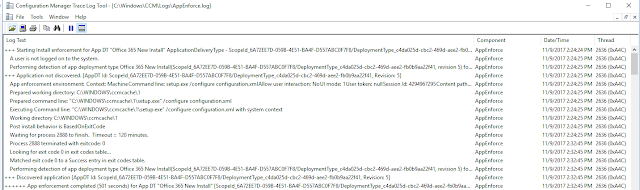
Dealt with a weird issue recently regarding SCCM and application installing. I was in the process of imaging a machine with SCCM when it was in the process of installing an application (Office 2016 in this case). I had to go, so I hard shut down the machine and put it away. Now, whenever I tried to reimage the machine, it would hang on installing Office 2016. If I held the hard shut down button, the machine had imaged correctly, and had joined the domain correctly. When I looked in the logs after logging in, I noticed that inside AppEnforce.log, instead of the normal logs, there were two install processes. I forgot to take a screenshot of the "bad" logs, but here's what they are supposed to look like. I noticed that there was an entry that said "Reconnecting to existing enforcement for "Office 365 New Install". AppProvider and/or CcmExec may have restarted before enforcement was complete." and then that there were duplicate entries for each entr...
Connect to SCCM Site with PowerShell

This script snippet can be used at the beginning of a script to dynamically find SCCM sites and then change directory to an SCCM CAS site, after which scripts can be run using SCCM cmdlets. $PathToInstall = #YourPathHere if (!(test-path ("C:\Program Files (x86)\ConfigMgrConsole\bin\ConfigurationManager.psd1"))) { $Install = Read-host "No Configuration Manager commandlet installed. Would you like to install?[Y/N]"     if ($Install -eq "Y")     {         #Install tools if desired         start-process msiexec.exe -argumentlist "/i $PathToInstall /q" -Wait     }     else     {         #Exits script, as this won't work without SCCM module         Write-host "No Commandlets found, exiting script"         pause         exit     } } #Import modules for AD and SCCM from the start import-module Act...

SCCM PXE Boot Issues - UEFI and Secure Boot

Image
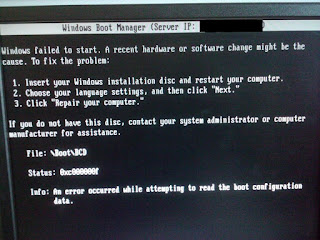
Issue: When attempting to image a machine using SCCM with UEFI and Secure boot on, you will get an error that states Windows failed to start. A recent hardware or software change might be the cause. File: \Boot\BCD Status: 0xc000000f Info: An error occurred while attempting to read the boot configuration data. Resolution: Disable Secure Boot and computer will image as intended

SCCM PXE Boot Issues - No Advertisements Found

Image
I've been battling with a pervasive issue with SCCM where the computer fails to install the SCCM task sequence on the first try, it won't ever boot again. It will constantly just present you with a "failed to boot" message, or something of that regard. Then when you attempt to boot it again, in the SMSPXE.log, it will give you an error that says "no advertisements found". You can see a sample of that log below This is by design of the SCCM system. It won't attempt to rerun a required deployment to the same MAC address. Resolution: I had only set up a deployment to unknown computers as required. The workaround I came up with is to also deploy an "Available" deployment to unknown computers. This will cause the task sequence to be offered as an optional deployment, and give you the chance to re-run the task sequence.