Posts

PowerShell Notes

Install programs through enter pssession ISE is dope Set-netipaddress Set-netipv6protocol How to tell if script exited succsfully -last exit code -so do an if to see if it exited with $last exit code $username Java script -taskkill.exe iexplore.exe -taskkill.exe chrome.exe Using regular expressions to search for critical errors through log files -get-eventlog Using the pipeline to ping multiple computers, using pipeline to connect to multiple computers pipeline -transmits data from one cmmdlet to another -data must be passed into the pipeline to be continued -converttocsv transmits data through the pipeline -exporttocsv does not -clixml has better hierarchy than a .csv file Rejoin computer to domain Test-computersecurechannel –repair Get-member Objects have properties Collection=table Object=row Property=column Objects usually have methods as well, use get-member (or gm) to get details on them PowerShell.exe -Command "Start-Process PowerShell.exe -ArgumentList '-ExecutionPo...

Connect to SCCM Site with PowerShell

This script snippet can be used at the beginning of a script to dynamically find SCCM sites and then change directory to an SCCM CAS site, after which scripts can be run using SCCM cmdlets. $PathToInstall = #YourPathHere if (!(test-path ("C:\Program Files (x86)\ConfigMgrConsole\bin\ConfigurationManager.psd1"))) { $Install = Read-host "No Configuration Manager commandlet installed. Would you like to install?[Y/N]"     if ($Install -eq "Y")     {         #Install tools if desired         start-process msiexec.exe -argumentlist "/i $PathToInstall /q" -Wait     }     else     {         #Exits script, as this won't work without SCCM module         Write-host "No Commandlets found, exiting script"         pause         exit     } } #Import modules for AD and SCCM from the start import-module Act...

Using a Filter and WMI to Get Information When a Property Returned is a Base Object

Image
When using WMI, particularly querying win32_offlinefileitem, one of the properties returned is a System.ManagementBaseObject. In this example, I want to look for OfflineFile items that have "ChangeInfo", then inside it the "DirtyInfo" is True. To do that, use dot notation in your filter, like so: gwmi win32_offlinefilesitem -Filter "changeinfo.dirty = 'true'"

Unable to Update BIOS

This happened on a Dell Latitude E7440, but could easily happen to a number of models. Just ran into an issue where I was unable to update the BIOS for a Dell Latitude E7440. The file would run, and the machine would attempt to restart, but it would hang on the "Restarting" screen. The issue ended up being with the display driver. I uninstalled the Intel HD Video Card driver version 20.19.15.4531, rebooted and was able to install the BIOS update.

Fast Way to Get User Attributes from AD Without using Get-ADUser

Get-ADUser is slow and cumbersome to get information from, and required the AD module to be installed on the computer. Here is a faster way to get information from AD, without that PowerShell Module. $objSearcher = New-Object System.DirectoryServices.DirectorySearcher $objSearcher.SearchRoot = New-Object System.DirectoryServices.DirectoryEntry $objSearcher.Filter = "(&(objectCategory=User)(SamAccountname=$($loggedinUser)))" $objSearcher.SearchScope = "Subtree" $obj = $objSearcher.FindOne() #Use the attributes found in AD to get properties, with example used below $FullName =$obj.Properties["cn"] $JobTitle =$obj.Properties["description"] $StreetAddress =$obj.Properties["streetAddress"] $City =$obj.Properties["l"] $State =$obj.Properties["st"] $ZipCode =$obj.Properties["postalCode"] $PhoneNumber =$obj.Properties["homePhone"] $FaxNumber =$obj.Properties["facsimileTelephoneNumb...

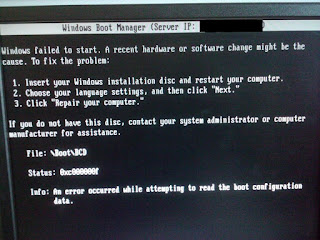
SCCM PXE Boot Issues - UEFI and Secure Boot

Image
Issue: When attempting to image a machine using SCCM with UEFI and Secure boot on, you will get an error that states Windows failed to start. A recent hardware or software change might be the cause. File: \Boot\BCD Status: 0xc000000f Info: An error occurred while attempting to read the boot configuration data. Resolution: Disable Secure Boot and computer will image as intended

SCCM PXE Boot Issues - No Advertisements Found

Image
I've been battling with a pervasive issue with SCCM where the computer fails to install the SCCM task sequence on the first try, it won't ever boot again. It will constantly just present you with a "failed to boot" message, or something of that regard. Then when you attempt to boot it again, in the SMSPXE.log, it will give you an error that says "no advertisements found". You can see a sample of that log below This is by design of the SCCM system. It won't attempt to rerun a required deployment to the same MAC address. Resolution: I had only set up a deployment to unknown computers as required. The workaround I came up with is to also deploy an "Available" deployment to unknown computers. This will cause the task sequence to be offered as an optional deployment, and give you the chance to re-run the task sequence.